
LABEL ROLL DIRECTION GUIDE
Why Label Roll Direction Matters for Printers and Applicators
Label roll direction describes how labels are positioned and unwind from a finished roll. It determines which edge of the label feeds first, whether the printed surface faces inward or outward, and how the roll is loaded into a printer, dispenser, or automatic labeling machine.
A roll can have the correct label size, material, adhesive, and artwork but still fail on the production line if the winding direction does not match the equipment. Incorrect roll orientation may cause labels to feed upside down, dispense from the wrong edge, trigger sensor errors, or require the operator to rewind the entire roll.
Before placing an order, confirm these four details:
- Whether the labels are wound face-in or face-out
- Which edge of the label should leave the roll first
- The unwind direction required by the printer or applicator
- The required core size and maximum finished roll diameter
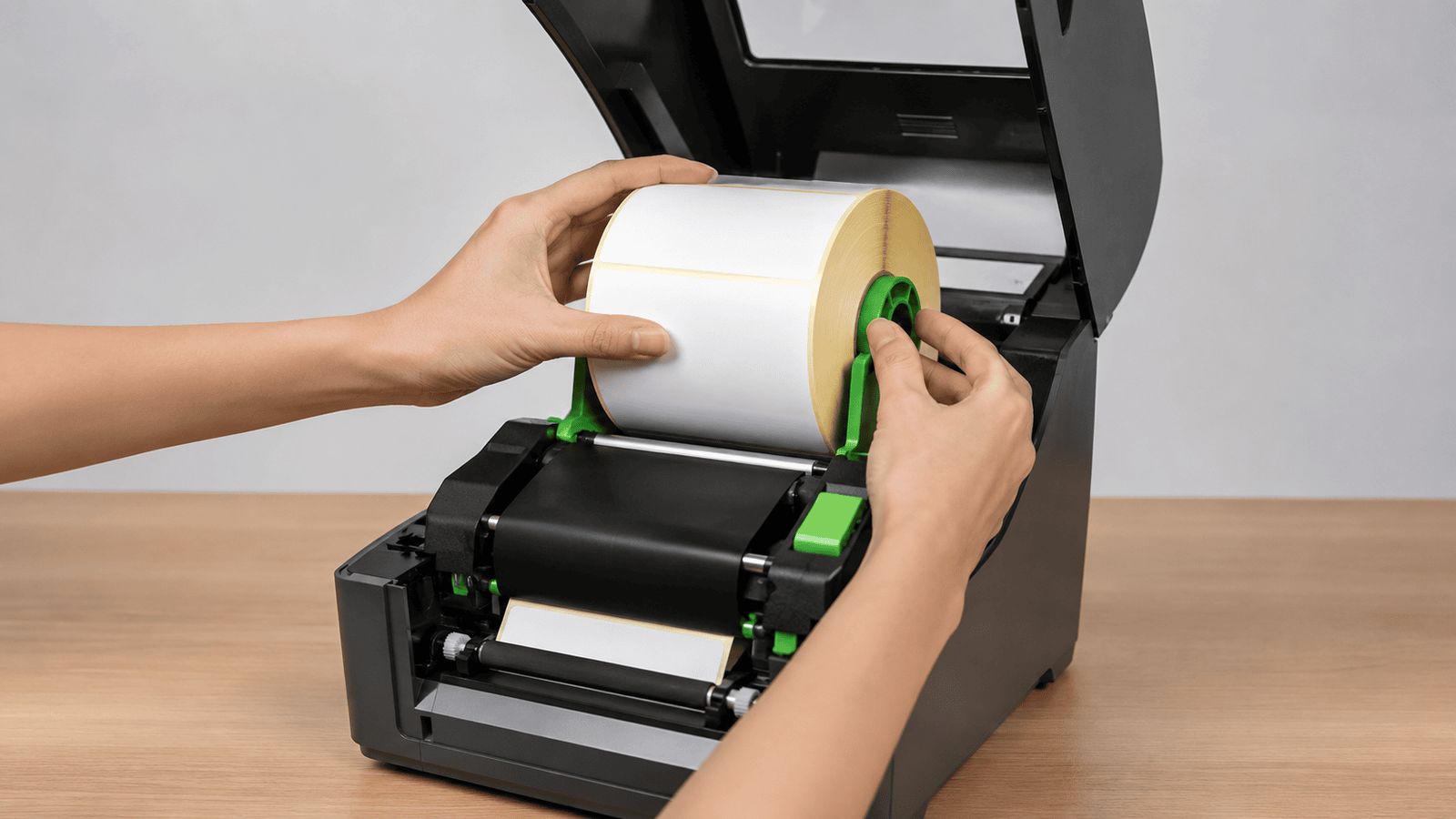
Face-Out, Face-In, and Leading Edge Explained
Label roll direction is determined by more than whether the printed surface faces inward or outward. A complete winding specification should also identify which edge of the label leaves the roll first. These three terms help printers, label suppliers and applicator operators describe the required roll orientation clearly.
Face-Out Winding
With face-out winding, the printable or printed label surface faces away from the core and remains visible on the outside of the roll. The release liner is positioned underneath the labels, closer to the center of the roll.
This format is commonly used with desktop and industrial label printers, although the correct orientation still depends on the printer feed path and printhead position.
Face-In Winding
With face-in winding, the printable or printed label surface faces toward the core. When viewing the outside of the roll, the exposed surface is mainly the release liner rather than the label face.
Some automatic applicators and packaging machines require face-in rolls because of the way the label web travels through the machine and reaches the peel plate.
Leading Edge
The leading edge is the first edge of the label to leave the roll during unwinding. Depending on the artwork and machine setup, it may be the top, bottom, left or right edge of the finished label.
Confirming the leading edge is especially important for labels containing directional text, barcodes, arrows or graphics that must reach the product in a specific orientation.
How the Eight Label Roll Directions Are Identified
The eight common label roll directions are created by combining four possible leading edges with two winding orientations: face-out and face-in. Together, these details determine how the label leaves the roll and enters a printer, dispenser or automatic labeling machine.
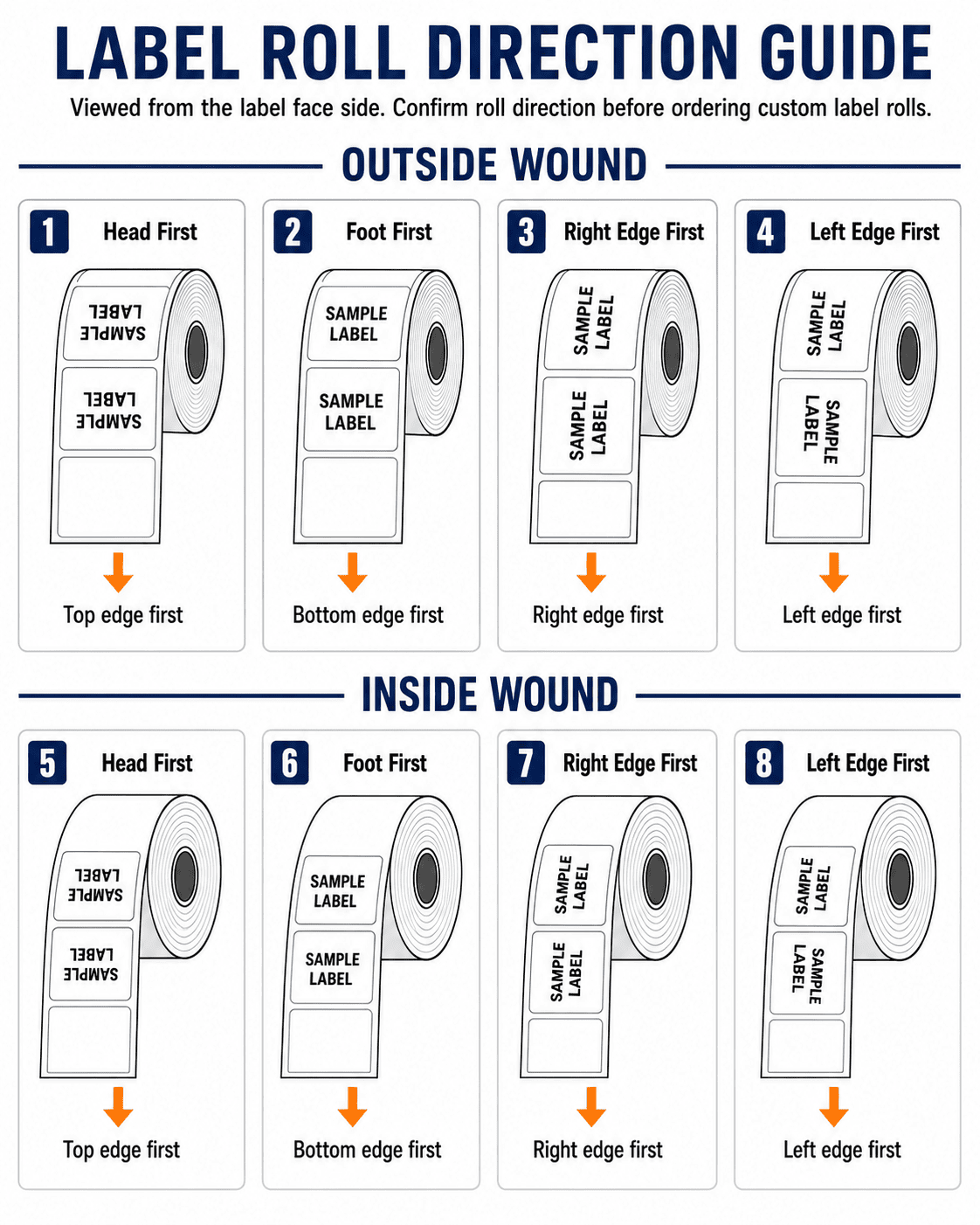
Top Edge First
The top edge of the approved artwork leaves the roll first. This orientation can be supplied as either face-out or face-in, depending on the printer feed path, dispensing direction and applicator setup.
Bottom Edge First
The bottom edge of the artwork becomes the leading edge. Both outward-facing and inward-facing winding formats are possible, so the required face direction must also be confirmed before production.
Left Edge First
The left side of the finished label feeds from the roll first. This direction may be required when rectangular labels enter the machine sideways or are applied in a specific orientation onto bottles and containers.
Right Edge First
The right side of the label leaves the roll first. As with the other leading-edge positions, it can be combined with either face-out or face-in winding to match the equipment and application direction.
Important: Direction numbers are not always universal. Different label suppliers and equipment manufacturers may assign different numbers to the same physical roll orientation. To prevent production errors, confirm the leading edge, face-in or face-out winding, artwork orientation and an approved roll-direction diagram together.
EQUIPMENT COMPATIBILITY
How to Specify Roll Direction for Printers and Applicators
The correct winding direction depends on how the label web travels through the equipment. A roll that feeds properly through a thermal printer may not be suitable for an automatic applicator, even when the label size, core and material are identical. The equipment path and final label orientation should therefore be confirmed before production.
LABEL PRINTERS
Requirements for Desktop and Industrial Printers
A label printer must position the printable surface correctly against the printhead. The roll also needs to unwind in the direction supported by the printer’s media path, sensors and roll holder.
- Confirm whether the printable surface must face outward or inward when loaded.
- Specify which edge of the artwork should feed beneath the printhead first.
- Check the required core diameter and maximum finished roll diameter.
- Confirm whether the printer uses gap, black-mark or continuous-media sensing.
- Make sure the liner and label width fit the printer’s media guides.
For directional artwork, a photo showing a correctly loaded roll is often more useful than providing only a direction number.
AUTOMATIC APPLICATORS
Requirements for Automatic Labeling Machines
An automatic applicator must unwind the roll, separate the label from the release liner at the peel plate and present it to the product in the correct orientation. The leading edge therefore directly affects how the label reaches the container or package.
- Confirm the machine’s unwind direction and whether the label face must be in or out.
- Identify which label edge must reach the peel plate first.
- Confirm the final orientation of text, barcodes and graphics on the product.
- Check the core size, roll diameter and maximum roll weight accepted by the machine.
- Verify the web path, liner width and any required rewind direction for the waste liner.
When possible, provide the applicator model, equipment manual or an existing approved roll sample so the winding specification can be matched accurately.
ORDERING CHECKLIST
What to Confirm Before Ordering Roll Labels
A clear roll-direction specification should describe the complete finished roll, not only the label artwork. Before production begins, confirm the equipment, winding orientation, artwork direction and physical roll dimensions together.
Equipment and Feed Path
Provide the printer, dispenser or applicator model whenever possible. The supplier needs to understand how the roll is loaded, where the printhead or peel plate is positioned and how the label web travels through the machine.
Face-In or Face-Out
Confirm whether the printable or printed label surface must face toward the core or away from it. This detail affects how the roll enters the equipment and whether the label face reaches the printhead or applicator correctly.
Leading Edge and Artwork
Mark which edge of the finished artwork should leave the roll first. Clearly identify the top of the design, especially when the label contains directional text, barcodes, arrows or product graphics.
Core and Roll Dimensions
Specify the core diameter, maximum finished roll diameter, liner width, labels per roll and any roll-weight limitation. These dimensions must fit the equipment even when the winding direction itself is correct.
The safest approach is to send a marked winding diagram together with the approved artwork and equipment information. A photo of a correctly loaded existing roll or a physical reference sample can further reduce ambiguity before production.
Frequently Asked Questions About Label Roll Direction
Label roll direction can affect printing, dispensing and automatic label application. The following answers cover the most common questions about face-in and face-out winding, leading edge, direction numbers and equipment compatibility.
Label roll direction describes how labels are positioned on the roll and how they unwind during use. It includes whether the label face is wound inward or outward and which edge of the artwork leaves the roll first.
With face-out winding, the printable or printed label surface faces away from the core and is visible on the outside of the roll. With face-in winding, the label surface faces toward the core. The correct option depends on the media path of the printer, dispenser or applicator.
The leading edge is the first edge of the label to leave the roll as it unwinds. It may be the top, bottom, left or right edge of the artwork. This is especially important when the label contains directional text, barcodes, arrows or graphics.
No. Direction numbers are not always universal, and different suppliers or equipment manufacturers may use different numbering systems for the same physical orientation. A marked diagram should be provided instead of relying only on a direction number.
Check the equipment manual, observe how an existing approved roll is loaded or confirm the required media path with the equipment supplier. You should identify whether the label face must be in or out and which artwork edge must feed through the machine first.
Provide the equipment model, face-in or face-out requirement, leading edge, artwork orientation, core diameter, maximum roll diameter, liner width and labels per roll. A photo of a correctly loaded roll or a physical reference sample can further reduce production errors.
CUSTOM ROLL LABELS
Need Roll Labels Wound for Your Printer or Applicator?
PaperMyna supplies custom roll labels for desktop printers, industrial label printers, dispensers, and automatic labeling machines. Share your label size, material, equipment model, winding direction, leading edge, core size, finished roll diameter, and order quantity, and our team can help confirm a practical roll specification before production.