
TICKET ROLLS & RECEIPT PAPER
Start with how the paper will be issued
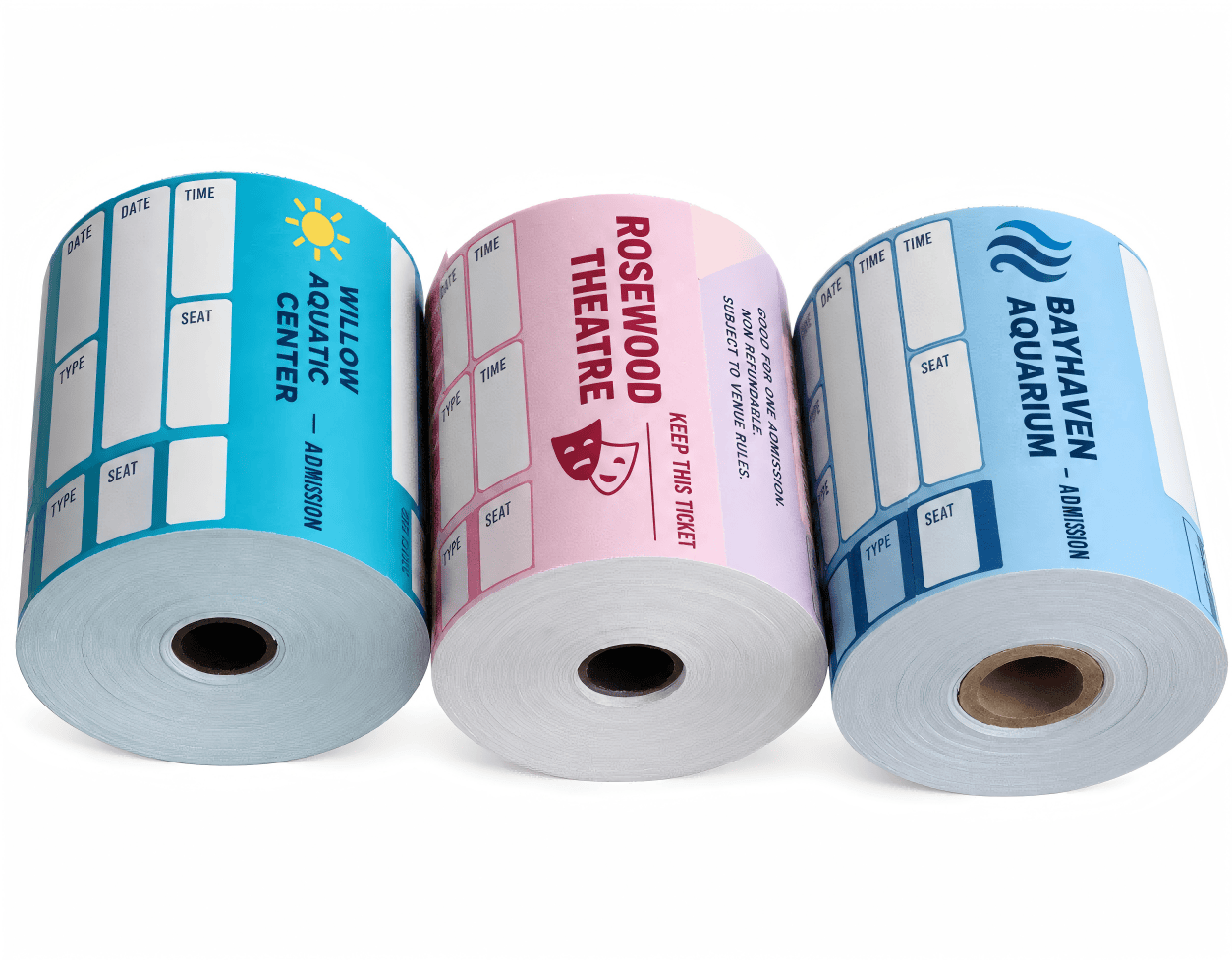
A ticket roll and a receipt roll can have the same width and still be unsuitable for the same machine. One may be a fully printed admission ticket torn off by hand; the other may be blank thermal paper that a POS printer cuts to the length of a transaction.
When comparing roll tickets and receipt paper, start with the job the paper must do. Does it carry a payment record, provide admission, leave a retained stub, or receive names and seat details at the counter?
Before approving artwork, confirm the paper stock, printing route, roll fit and separation method. For machine-issued tickets, add a separate check for the feature the printer uses to find each ticket.
COMPARE THE SPECIFICATION
A shared roll format does not make the paper interchangeable
These are common arrangements. The approved stock and the equipment specification take priority over the product name.
For a checkout application, start with the specification for thermal receipt paper rolls. For admission or redemption, review the required ticket layout and issuing process together.
PAPER & PRINTING ROUTE
Preprinted artwork does not identify the printing surface
A fully preprinted roll can be issued without adding anything at the counter. When a printer will add the date, price, seat or serial number, the stock must suit that printing method.
Direct thermal printing needs a heat-sensitive coating on the correct face. Thermal transfer uses a ribbon and a compatible stock. An impact receipt printer uses its own ribbon and specified paper; a carbonless copy arrangement needs the correct multi-ply construction. These routes cannot be selected from a photograph of the roll.
Leave suitable clear areas for variable details. Check the final print against the artwork, including any barcode quiet zones and the area retained after tearing. A coloured background or decorative design must not make required information difficult to read.
Ask for both paper weight in g/m² and thickness in micrometres or millimetres when thickness matters. Weight is not a substitute for caliper, and matching the width alone does not confirm that a ticket will pass through the printer.
TEARING, POSITIONING & FEEDING
Specify four different features separately
A tear line helps someone separate the ticket. A registration feature helps compatible equipment locate it. Continuous feed holes serve a mechanical feeding function.
SEPARATION
Perforation / tear line
Small cuts and connecting bridges form a controlled tear line between tickets or beside a stub. Agree its position and test the tear. Do not assume an ordinary perforation is the printer’s registration reference.
OPTICAL REFERENCE
Black registration mark
A printed mark can provide a repeat reference for a compatible reflective sensor. Follow the model’s required mark size, printed face and sensor position. Keep unrelated artwork from interfering with that sensing track.
PUNCHED REFERENCE
Registration hole / notch
A punched hole or edge notch can identify each repeat for compatible equipment. Its shape, pitch and distance from the edge must match the sensor’s requirements. Confirm the sensing mode rather than assuming every hole is detected in the same way.
MECHANICAL FEED
Continuous feed holes
Repeated holes along the paper edges engage the pins of a tractor-feed mechanism. Specify the hole pattern and feed margins for that equipment. These rows are different from a registration hole placed to identify each ticket repeat.
PaperMyna also supports punched registration features. Send a drawing that identifies the tear line and the registration hole or notch separately, with the feed direction and printed face marked. A hand-dispensed roll may need perforations without a printer registration feature.
For technical background, Zebra’s media identification guidance separates tear perforations from position-control features. Epson’s continuous-paper loading instructions show how feed holes engage tractor pins. Use the manual for your actual equipment to set dimensions.
NUMBERING & RETAINED SECTIONS
Check the information that remains after tearing
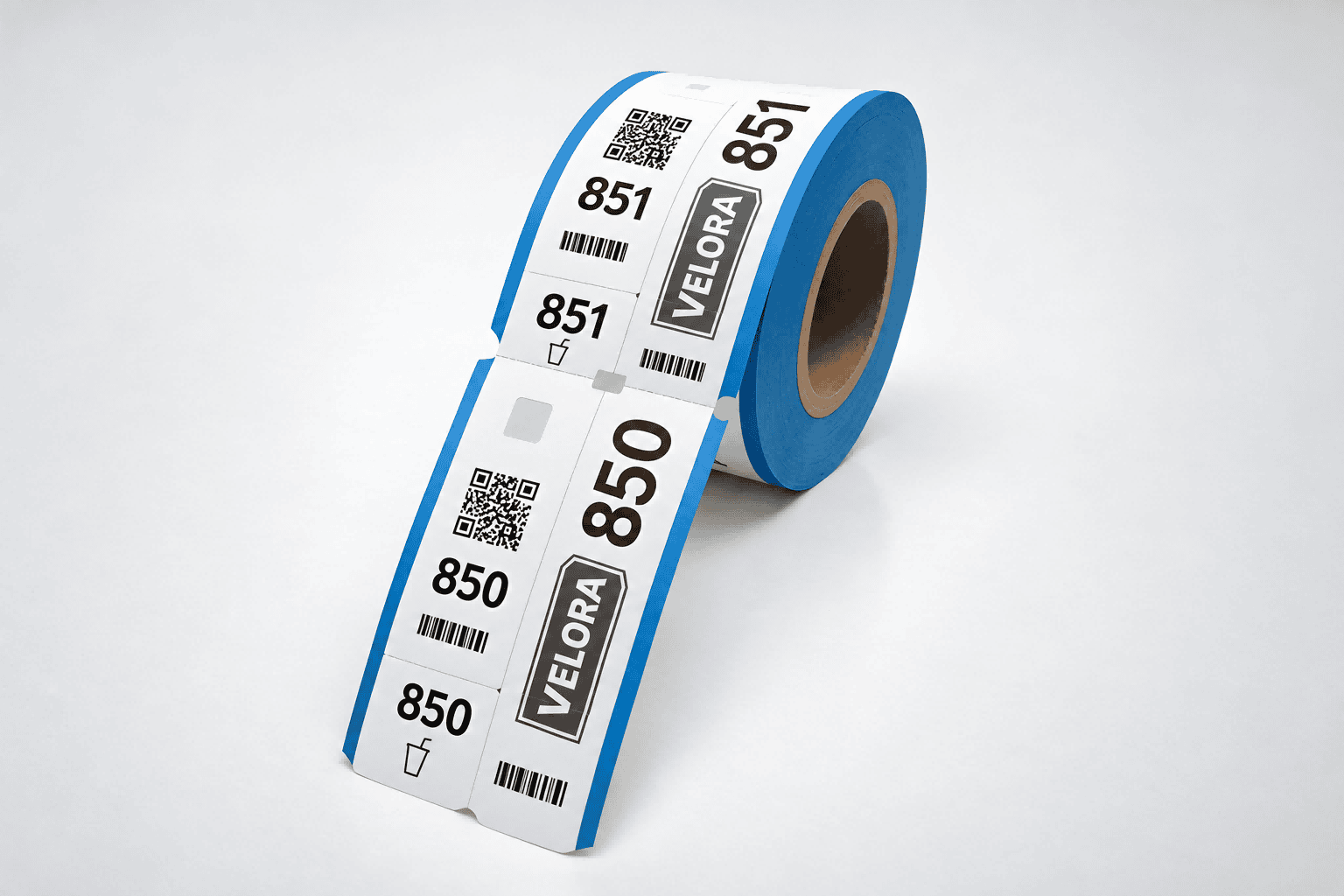
For a two-part admission ticket, staff may keep a stub while the visitor keeps the main section. A matching number can link those parts. In a multi-part voucher, the same identifier may appear on several sections.
Define the starting number, ending number, prefix, digit length and whether the sequence continues across rolls. Confirm which sections repeat the identifier. A numbered mock-up illustrates the layout; production data still needs its own check.
Keep required names, dates, numbers and codes clear of the tear line. Tear a sample and inspect each retained part. If staff scan a code after removing the stub, that code and its quiet zone must remain intact.
A visible serial number provides a reference for checking. It does not by itself prevent copying. Any validation or access-control function also needs the appropriate issuing and checking process.
See our custom tickets and vouchers for roll, admission and detachable-section formats.
BUILD THE ORDER BRIEF
Send a dimensioned specification with the artwork
A photo shows the layout but rarely settles paper thickness, core fit or the position of a sensing feature. Keep the following details together so the artwork and roll construction can be reviewed against the same brief.
- Use and issuing: admission, redemption or receipt; manual dispenser or exact printer model.
- Paper: grade, weight, thickness, finish and printing method, including the coated face where applicable.
- Roll: paper width, outer diameter, core inside diameter, winding direction and required ticket count or length.
- Ticket repeat: finished ticket length in the feed direction, stub dimensions and every tear-line position.
- Registration: mark, hole or notch dimensions, pitch, edge offset and the side viewed by the sensor.
- Print and data: front and reverse artwork, blank variable fields, numbering sequence and supplied code data.
- Supply: quantity, packing, roll identification and delivery destination.
State dimensions in one agreed unit and show the feed direction on the drawing. Keep the usable ticket width distinct from any removable tractor-feed margins. For broader roll-loading considerations, our roll direction guide explains the terminology; a ticket roll must still follow its own equipment specification.
BEFORE THE PRODUCTION RUN
Test the finished sample in its actual workflow
A digital proof checks content and placement. A physical sample is needed to assess feeding, sensing, tearing and handling.
Check a sequence of tickets
- Load: check core fit, diameter, paper orientation and the feed path.
- Print and position: use the intended settings and supported calibration procedure. Check whether text stays aligned across successive tickets.
- Separate: tear or cut as staff will during normal use. Look for premature separation, difficult tearing or damage to retained information.
- Verify data: check paired numbers and the sequence between tickets and rolls. Test supplied codes with the intended reader and system.
- Handle: check the ticket after representative counter handling and storage, using the selected stock’s requirements.
Record the approved paper reference, drawing version, artwork and trial settings. Keep a finished sample with the order record so the next run can be compared against it.
TICKET ROLL FAQ
Roll tickets and receipt paper: common ordering questions
These questions cover printer compatibility, tear lines, registration features and the details to confirm before ordering.